


How to Read a Margin Sheet and Price Products for Profit
How to Read a Margin Sheet and Price Products for Profit
You found a product that looks promising. The reseller cost is low, the retail price is high, and you’re already calculating what you’ll do with the profit. Then you actually run the numbers and the margin is thinner than you thought—or worse, you realize you forgot to account for shipping, platform fees, or returns.
This happens more than most resellers want to admit. Pricing products for profit isn’t just about slapping a markup on your cost. It starts with understanding the margin sheet—the document that tells you exactly what you’re working with before you commit to a single order.
Whether you’re sourcing through Randmar for the first time or you’ve been reselling for years and want to tighten up your pricing, this guide walks you through how to read a margin sheet, what each number means, and how to set prices that actually protect your bottom line.
What Is a Margin Sheet?
A margin sheet is a pricing document provided by your distributor or supplier that outlines the cost and pricing structure for each product. At its core, it answers a simple question: how much will you pay, and how much room do you have to make money?
Depending on the distributor, a margin sheet might be a spreadsheet, a product listing with pricing tiers, or a dashboard view inside a sourcing platform. Regardless of format, the key data points are the same.
The Core Fields You’ll See
SKU or Product Code: The unique identifier for each product. This is what you’ll use to place orders, track inventory, and match listings across platforms.
Reseller Cost (Your Cost): The price you pay the distributor per unit. This is your starting point for every margin calculation. On Randmar, this shows up as your account-specific reseller price based on your pricing tier.
MSRP (Manufacturer’s Suggested Retail Price): The price the manufacturer recommends the product be sold at to end consumers. It’s a guideline, not a rule—but it sets the ceiling for how your pricing will be perceived.
MAP (Minimum Advertised Price): Some manufacturers set a MAP, which is the lowest price you’re allowed to publicly advertise. You can sell below MAP in some cases, but you can’t promote that price in ads or product listings. Violating MAP policies can cost you your brand authorization.
Margin or Markup Percentage: Some margin sheets calculate this for you. If they don’t, you’ll need to do it yourself. And here’s where most resellers trip up—because margin and markup are not the same thing.
Margin vs. Markup: The Difference That Costs You Money
These two terms get used interchangeably, but they measure different things. Confusing them will either make you think you’re more profitable than you are or cause you to underprice your products.
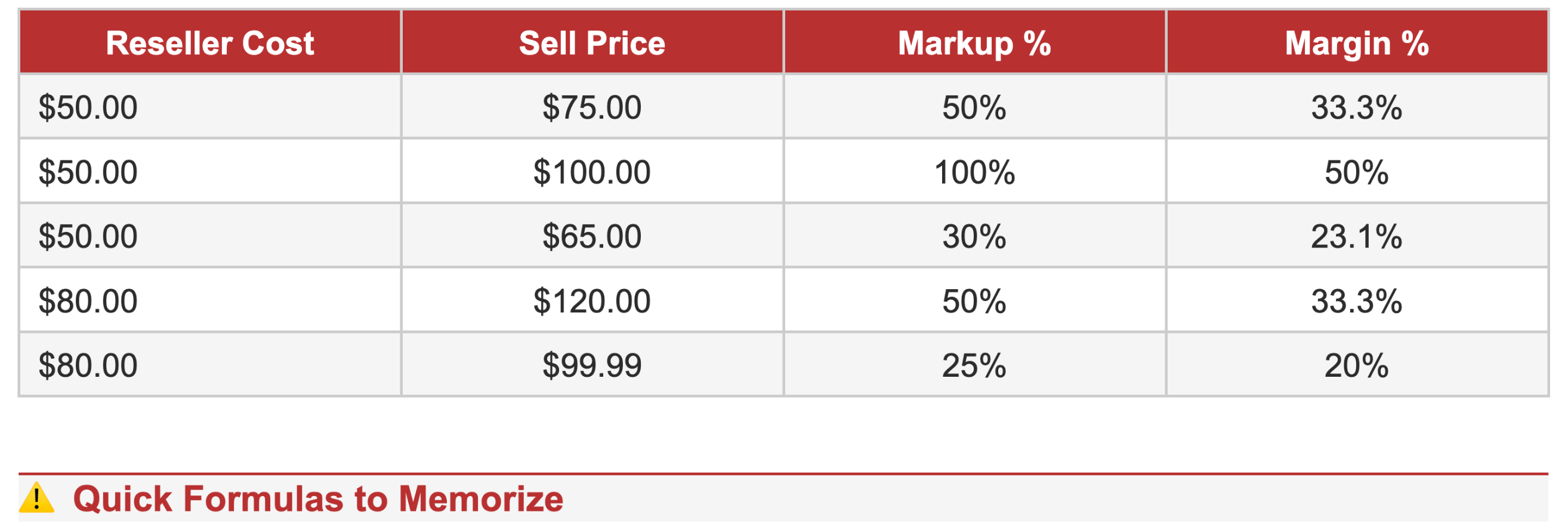
Markup is the percentage added on top of your cost. If a product costs you $50 and you sell it for $75, your markup is 50% ($25 ÷ $50).
Margin is the percentage of the selling price that’s profit. Using the same numbers: $25 ÷ $75 = 33.3% margin.
Same product, same dollar amount earned, but a 50% markup only gives you a 33% margin. The higher your price, the wider that gap becomes.
Margin = (Sell Price – Cost) ÷ Sell Price × 100Markup = (Sell Price – Cost) ÷ Cost × 100
When reading a margin sheet, always confirm which formula was used. A “40% margin” and a “40% markup” represent very different amounts of profit.
How to Calculate Your True Margin
Your margin sheet gives you the starting numbers, but your real margin depends on everything that happens between placing the order and collecting the payment. Here’s how to think about it.
Step 1: Start with the Reseller Cost
This is what you pay per unit. On Randmar, your reseller cost is visible in your portal and adjusts based on your pricing tier (Starter, Commercial, or E-Commerce).
Step 2: Add Your Operational Costs
Before you set a sell price, account for the costs that eat into your margin. These include shipping and handling (either what you pay to ship to your customer or what the distributor charges), platform or marketplace fees (Amazon referral fees typically run 8–15%, Shopify has transaction fees, eBay takes its cut), payment processing (credit card processing, usually around 2.9% + $0.30 per transaction), returns and damages (a reserve of 2–5% is a common industry practice), and packaging if you’re adding branded packaging or bundling items.
Step 3: Set Your Sell Price
With your loaded cost (reseller cost + operational costs), you can set a sell price that delivers the margin you actually need. A common target for e-commerce resellers is a 25–40% gross margin after all variable costs.
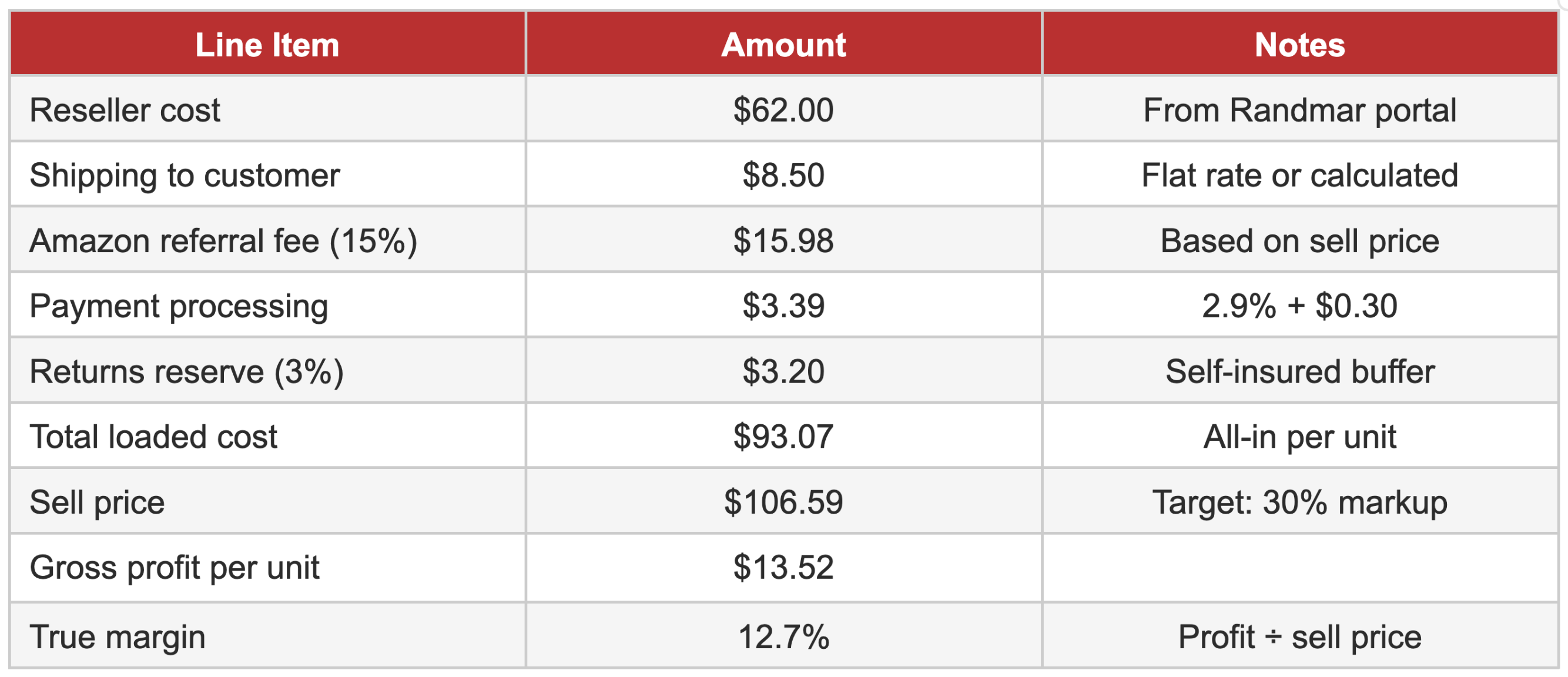
Notice the gap: a 30% markup on your loaded cost only gives you about 12.7% true margin. That’s why working backwards from your target margin is smarter than just adding a flat percentage on top of your cost.
Working Backwards from Your Target Margin
The most reliable pricing method is to start with the margin you need and work backwards to find your minimum viable sell price.
The Formula
Sell Price = Loaded Cost ÷ (1 – Target Margin)
Example: If your loaded cost is $93.07 and you want a 25% margin, your minimum sell price is $93.07 ÷ 0.75 = $124.09.
Then check that price against the MSRP and MAP. If your minimum viable sell price is above MSRP, the product may not work for your channel. If it’s below MAP, make sure you’re not advertising it publicly at that price.
This is where Randmar’s transparent pricing becomes a real advantage. Because you can see your reseller cost and compare it against retail pricing before you commit, you can run these calculations before placing a single order—not after.
Pricing Strategies That Protect Your Profit
Knowing your numbers is step one. Using them strategically is where resellers separate themselves from the pack.
Price to the Channel, Not Just the Product
A product that works at 30% margin on your Shopify store might not work on Amazon once referral fees are factored in. Run the margin calculation per channel, not just per product. The same SKU might need different strategies depending on where you sell it—though your advertised retail price should remain consistent to avoid channel conflict.
Don’t Race to the Bottom
Competing on price alone is a losing strategy for most resellers. If your margin is razor-thin, one return or one shipping error wipes out your profit on multiple sales. Instead, compete on availability, speed, bundling, or service. Resellers who sell to businesses (schools, offices, government) often command better margins because they’re solving procurement problems, not just selling a product.
Use No-MOQ Sourcing to Test Before You Commit
One of the biggest advantages of sourcing through Randmar is that there are no minimum order quantities. That means you can test a new product at small volume, validate the margin in real market conditions, and scale up only when the numbers prove out. You’re not stuck with 200 units of a product that sells at a 10% margin when you thought it would be 30%.
Watch for Margin Compression Over Time
Margins can erode without you noticing. Competitors enter the market, platforms raise fees, shipping rates increase, or the manufacturer adjusts pricing. Build a habit of reviewing your top-selling SKUs quarterly. If a product’s margin has dropped below your threshold, either raise your price, negotiate better terms, or reallocate your budget to higher-margin products.
Common Margin Sheet Mistakes to Avoid
Confusing margin and markup. We covered this above, but it’s worth repeating. A 40% markup is not a 40% margin. Always confirm the formula.
Ignoring MAP policies. Advertising below MAP can get your listing removed or your brand authorization revoked. Check the manufacturer’s policy before setting a public price.
Forgetting platform fees. Amazon, eBay, Walmart—they all take a percentage. If you calculate your margin based on reseller cost and sell price alone, your actual profit will be significantly lower.
Not accounting for returns. Even a 3–5% return rate eats into margin. Build it into your pricing from day one.
Pricing once and forgetting. Costs change. Fees change. Competitors change. Your pricing should be a living part of your business, not a set-and-forget decision.
How Randmar Makes This Easier
Most distributors make you dig for pricing information or negotiate on every order. Randmar is built differently. Your reseller portal shows transparent pricing for every SKU across 69 manufacturers and over 17,000 products—all with Canadian inventory, no minimum orders, and the ability to mix brands in a single cart.
That means you can pull up a product, see your cost, compare it to MSRP, and run your margin calculation before you buy. You can source one unit to test or a hundred to scale. And with the Randmar Assistant built into your portal, you can get product recommendations, margin analysis, and sourcing support right where you work.
No guesswork. No bloated minimums. Just clear numbers so you can make smart, profitable decisions.
Ready to See the Numbers for Yourself?
Create your free reseller account at randmar.io and start browsing the full product catalogue with commercial pricing. No minimum orders, no commitments.