
Choose your agent
Start on a laptop with Codex or Claude Code. Both can guide your brand work; actual store implementation depends on the tools and permissions you verify below. Keep one project/chat for this business so approved work stays together.
Codex
RecommendedUse Codex in the ChatGPT desktop app with a local project, your files, browser previews and connected tools.
Install the desktop app for CodexClaude Code
Use the Code tab in Claude Desktop with a local project folder, your files and verified connectors. Claude Chat and the standalone Claude Code CLI have different setup paths.
Install Claude DesktopAI agents
With supported tools and your approval, your AI assistant can draft product listings, help implement approved store changes and answer questions about verified catalog, pricing and order data. Campaign launch needs separate authorization. Monitoring happens only during supported interactions or through a service you have actually configured.
New to AI agents? Think of one as a capable assistant you talk to in plain English. You describe what you want — “write a product description for this item,” “set up a Google ad,” “what did I sell this week?” — and it does the work, asks a clarifying question when it needs one, and hands back a result you review and approve. No coding required.
You stay in control. The agent handles the repetitive, time-consuming tasks so a one-person business can move like a full team — you point the direction, it executes.
What can an agent do for you?
- Research niches and recommend high-margin products from the live Randmar catalog.
- Write and polish your product listings, brand story, and store policies.
- Build and edit your storefront with Shopify Sidekick — components, bulk edits, and branding.
- Generate product images and video for your ads through the Randmar Image & Video API.
- Build, launch, and monitor advertising campaigns across Meta, Google, TikTok, and more.
- Pull live answers about your catalog, cost, pricing, and orders in plain language.
- Follow your saved SOPs — the Shopify CEO playbook and others — so quality stays consistent every time.
How it works
- You give a plain-English request.
- The AI agent carries out the work: listings, ads, orders.
- You review and approve.
Randmar document readiness
Install the Randmar MCP connection using the ChatGPT and Codex setup guide or Claude setup guide, then authenticate your own Randmar account. Ask your assistant to discover its current Randmar tools, resolve your authorized Partner application ID, read your Partner account, and confirm access to Partner Attachments.
The readiness check must distinguish actual PDF upload from durable Partner-level PDF registration. Both registration and download verification must be supported before the assistant synchronizes an approved brief. A temporary upload key is not a saved attachment. If a capability is missing, record it as pending and continue the educational exercise. If your Partner account does not exist yet, keep the approved document in your assistant's supported durable file/task storage and revisit it at account connection or your next authenticated interaction. This page does not run a background queue.
Shopify is not required to synchronize Academy documents. Connect Shopify separately when your store work needs it. Module 01 remains setup only, with no final PDF.
Shopify
Shopify is where your brand lives — your storefront and digital flagship. It holds your products, orders, and customers, and it’s where a buyer actually checks out. It also connects to your AI tools as a plugin.
Think of Shopify as the ERP of your e-commerce business — the central operating system the whole store runs on. It doesn’t just host your storefront; it can connect supported sales and advertising platforms through configured integrations. Verify each connection, its permissions and what actually synchronizes; installation alone does not establish a complete or accurate shared data source.
Why is Shopify the foundation?
- Sovereignty: You own everything — your customer data, your brand, and your equity — instead of renting it from a marketplace.
- RevOps hub: It’s the hub of your revenue operations: clean tracking for Google, Meta, and TikTok so their algorithms optimize on accurate data.
- One system: Connect supported sales channels and configure their catalog, pricing, shipping and tax behavior. Verify each integration; installation does not guarantee synchronization.
- Built to convert: Lightning-fast native themes and a frictionless checkout help customers shop comfortably. Conversion depends on your offer, audience and execution; no theme guarantees a rate.
Connect the Shopify plug-in
If you already have a store, connect that exact intended store. If not, begin brand work in Module 02 and follow Module 03’s new-store setup; an existing store connection is not a prerequisite for the interview. ChatGPT Chat or Claude Chat can help with drafting, but the conference implementation path uses a capable Codex or Claude Code local project. Verify the actual account tools and browser access in that project.
Codex / ChatGPT
- Open Shopify in the ChatGPT plugin directory. If the link is unavailable in your workspace, open Plugins and search for Shopify, published by Shopify.
- Choose the supported ChatGPT web/desktop surface for your account. For local development or browser work, use a capable authorized desktop/Codex environment; a chat-only connection may not provide these tools.
- Use the installation control shown in your current interface.
- Add the Shopify plugin to your ChatGPT account.
- Connect your Shopify account.
- When prompted, click Connect, sign in to Shopify, and authorize the requested permissions.
- Start using Shopify in ChatGPT.
- Once connected, you can use Shopify directly in your ChatGPT conversations to access store information and supported Shopify tools.
Claude Code in Claude Desktop
Open the Code tab and select your own local project folder. Add the Shopify connector from the session’s + menu using Add connectors (or Connectors → Browse connectors). Manage it in Settings → Connectors, then confirm the connector is available in this Code session. A connection in a separate chat or CLI is not proof of access here.
- Open the official Shopify connector in Claude.
- Go to the Shopify connector page in Claude and click Add to Claude.
- Connect your Shopify account.
- Sign in to Shopify when prompted and select the store you want to connect.
- Approve access.
- Review the requested permissions in your Shopify Admin, then approve the connection.
- Start using Shopify in Claude.
- Once connected, mention Shopify in your Claude conversation to manage products, orders, inventory, customers, discounts, analytics, and more.
Check your capabilities before starting
Ask your assistant to perform the following read-only checks one at a time. It must distinguish Ready, Needs your action, and Unavailable; this page cannot inspect your accounts. No setup PDF is required.
- Brand work: confirm it can read your supplied files, research current sources, and retain a concise checkpoint in this project. If you have no name or assets yet, Module 02 helps you choose them.
- Reports: confirm PDF creation and page inspection, or use the complete-report builder in each module plus a page-by-page learner review. Keep downloaded copies.
- Store work: if a store exists, read its exact Shopify hostname and verify the intended store. Inspect available authoring, theme and preview capabilities without changing anything. If no store exists, follow Module 03’s new-store branch. Brand interviewing can begin before Shopify is ready.
- Browser/development: confirm a supported way to save and inspect Shopify theme changes. For tools without direct theme access, use authorized local development or the signed-in Shopify theme editor with precise guidance. For email workflows, desktop Messaging/Flow access is required; a generic Shopify API connection is insufficient. If your assistant cannot operate the browser, keep implementation open and use an authorized desktop assistant/developer with the same approved brief.
- Randmar: authenticate through your chosen setup guide, verify your Partner identity and account state, and discover attachment capabilities. If account approval is pending, continue brand work and independent research; do not create duplicate accounts or claim product import is ready.
- Before Modules 05–06: check platform eligibility, permissions, required languages/reviewer, preview access, support mailbox and separately authorized controlled-test facilities. Missing access is a specific next action, not permission to claim completion.
Keep your full PDFs private. In a new chat or a different assistant, attach the relevant prior PDFs and their Resume context. Browser-local reports do not automatically transfer to Codex or Claude Code. Review the workshop readiness checklist.
This is now your operating system
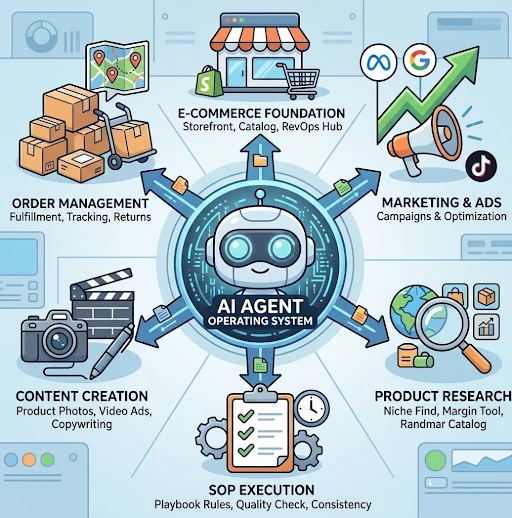
- E-commerce foundation: Storefront, catalog, RevOps hub.
- Marketing and ads: Campaigns and optimization.
- Product research: Niche find, margin tool, Randmar catalog.
- SOP execution: Playbook rules, quality check, consistency.
- Content creation: Product photos, video ads, copywriting.
- Order management: Fulfillment, tracking, returns.
Continue with the community
Join the Telegram group for daily insights, updates, and direct community interaction. Share your results and get feedback from everyone.
Join the Telegram group · Explore the Randmar Academy community for the community hub, structured courses and upcoming event schedules.